Matching supplier invoices to your MechanicDesk stock
The hard part of invoice automation isn't reading the PDF, it's knowing which of your stock items each line actually is. Suppliers print their own codes, add spaces and dashes, and list freight however they like. Data Entry Pro is built around getting that match right.
Why it's a pain to do by hand
Get matching wrong and you end up with duplicate stock items: the same filter under three numbers, with stock levels and costs split between them. That's worse than typing it in by hand.
How Data Entry Pro does it
- 1
Each line's part number is normalised, so DB-1365TSA and DB1365TSA# are treated as the same part, and common scan mix-ups like O/0 and I/1 are handled.
- 2
Lines are matched to the PO line or stock item with that number in your MechanicDesk.
- 3
With Supplier / Alternate Part Number Matching on, it also checks the supplier part numbers you've saved against your stock, and the other codes printed on the line (like OE or brand numbers). Brand names alone are ignored.
- 4
Spacing differences (651562 22 100 vs 65156222100) are handled, and a match is confirmed against the supplier link before it's used.
- 5
Freight, postage and delivery charges are recognised and go to your FREIGHT item.
What ends up in MechanicDesk
- Part numbers normalised before matching
- Your own stock number used when the supplier prints theirs
- No duplicate items for parts you already stock
- Freight standardised to one item
- Unknown parts stay plain lines (or become new items if you turn on Create Products)
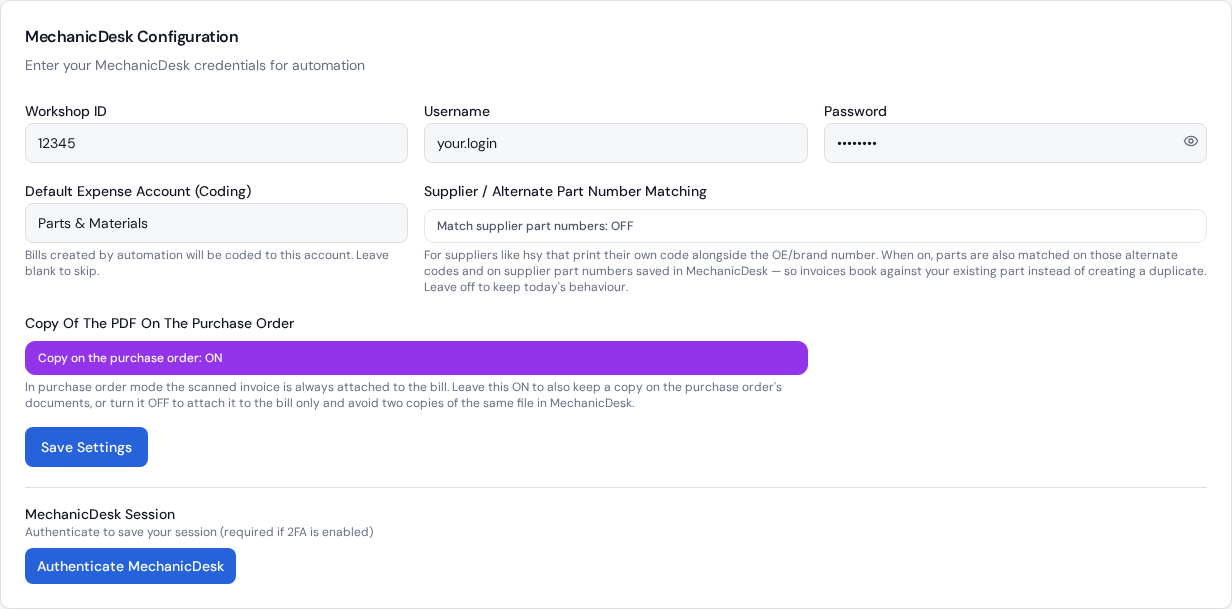
The settings that control it
Supplier / Alternate Part Number Matching
In Settings, off by default. Turn it on if you keep stock under your own numbers and save the supplier's number against it.
Create Products
Create new stock items for parts that genuinely aren't in your inventory.
Frequently asked questions
My supplier prints their own catalogue number, but I stock the part under the OE number. Will it match?
Yes, if you've saved the supplier's number against the stock item in MechanicDesk (as a supplier part number) and turned on Supplier / Alternate Part Number Matching. The line books against your existing item instead of creating a new one.
Why is supplier part number matching off by default?
Most workshops stock parts under the supplier's number, and for them the standard matching is all they need. The extra lookups only run for workshops that switch it on.
Does it slow things down?
Barely. In our tests standard invoices took the same time with it on, and supplier-number lines added about a quarter of a second each.
What happens to freight?
Freight, delivery, postage and courier lines are recognised and booked to your FREIGHT stock item, so it's tracked consistently.
Related workflows
Purchase order automation
Automate MechanicDesk purchase orders: Data Entry Pro reads the PO number off the supplier invoice, matches every line, updates prices, receives the PO and creates the bill with the PDF attached.
Read moreDirect bill automation
No purchase order? Data Entry Pro creates the supplier bill in MechanicDesk straight from the invoice PDF: supplier, reference, dates, every line, expense account and the PDF attached.
Read moreParts receipting
Receive parts into MechanicDesk from the supplier invoice: correct quantities, latest cost prices and the bill created, with part deliveries and back orders handled.
Read moreReady to stop keying invoices?
7-day free trial. 10 invoices on us. No credit card required.