MechanicDesk back order automation
Suppliers ship what they have. Half your order turns up today, the rest next week on a different invoice that still quotes your original PO number. Data Entry Pro keeps track of that for you, so back orders don't sit in MechanicDesk as pending forever.
Why it's a pain to do by hand
Part deliveries are where manual entry goes wrong most often. Someone receives the whole PO by mistake, or receives the right quantities but forgets the back order, or the second invoice gets entered against the original PO that was already received. The result is stock levels and costs you can't trust.
How Data Entry Pro does it
- 1
The first invoice only covers some of the PO. With Back Orders On, Data Entry Pro receives exactly the quantities delivered.
- 2
MechanicDesk creates the back order PO for the rest (for PO 1844 that's 1844/1), and Data Entry Pro bills what arrived.
- 3
The next invoice arrives quoting the original PO number. Data Entry Pro sees that PO was already received and goes to the open back order instead.
- 4
If that delivery is still short, MechanicDesk creates the next back order (1844/2) and the cycle continues until the order is complete.
What ends up in MechanicDesk
- Delivered quantities received, not the full order
- Back order PO created by MechanicDesk for the remainder
- Later invoices routed to the open back order
- Already-received POs never edited
- Same invoice run twice = no duplicate
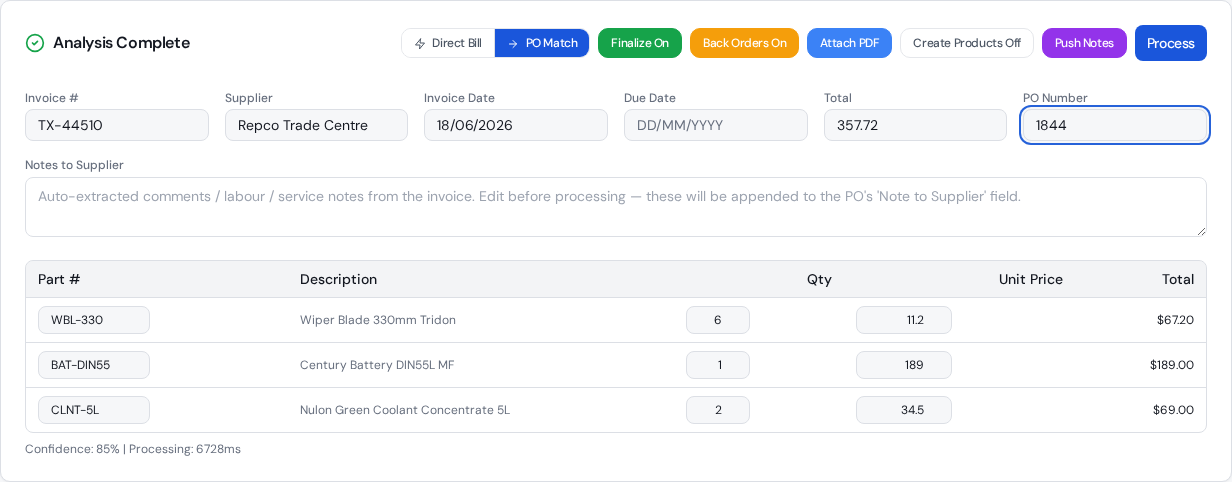
The settings that control it
Back Orders On
Receive what was delivered and create back orders for the rest.
Back Orders Off
If an invoice doesn't cover the whole PO, only prices are synced and no bill is created, so nothing is received by mistake.
Frequently asked questions
The supplier's second invoice still shows my original PO number. Is that a problem?
No, that's the normal case. Data Entry Pro follows the original PO to its open back order (/1, /2 …) and bills against that.
What if I turn Back Orders off?
Then an invoice that doesn't cover the whole PO only updates prices on the PO and doesn't create a bill. It's the cautious option if you'd rather receive part deliveries yourself.
What if there's no open back order?
If the PO has already been received and nothing is left open, Data Entry Pro stops with a clear message and changes nothing, rather than editing a received PO.
Do I need to create the back order myself?
No. MechanicDesk creates the back order PO when the partial receipt is processed. Data Entry Pro just receives the right quantities and keeps track of which PO is open.
Related workflows
Purchase order automation
Automate MechanicDesk purchase orders: Data Entry Pro reads the PO number off the supplier invoice, matches every line, updates prices, receives the PO and creates the bill with the PDF attached.
Read moreParts receipting
Receive parts into MechanicDesk from the supplier invoice: correct quantities, latest cost prices and the bill created, with part deliveries and back orders handled.
Read moreDirect bill automation
No purchase order? Data Entry Pro creates the supplier bill in MechanicDesk straight from the invoice PDF: supplier, reference, dates, every line, expense account and the PDF attached.
Read moreReady to stop keying invoices?
7-day free trial. 10 invoices on us. No credit card required.