Receipting parts into MechanicDesk from the invoice
Receiving stock is where your inventory numbers come from. If the quantities or cost prices are wrong at receipt, every quote and stock count after that is off. Data Entry Pro receives parts straight from what the supplier actually invoiced.
Why it's a pain to do by hand
Receipting by hand means reading quantities and prices off the invoice and keying them against the PO. It's easy to receive the ordered quantity instead of the delivered one, or keep an old cost price that's since gone up.
How Data Entry Pro does it
- 1
Upload the invoice with PO Match. Data Entry Pro matches each line to the PO.
- 2
Cost prices on the PO are updated to the invoiced prices before anything is received.
- 3
Quantities are received as delivered. On a part delivery the rest goes to a back order (with Back Orders On).
- 4
The PO is received in MechanicDesk, which updates your stock, and the bill is created against it.
What ends up in MechanicDesk
- Delivered quantities, not ordered quantities
- Latest cost prices from the invoice
- Stock updated by MechanicDesk on receipt
- Bill created and linked
- Part deliveries go to a back order
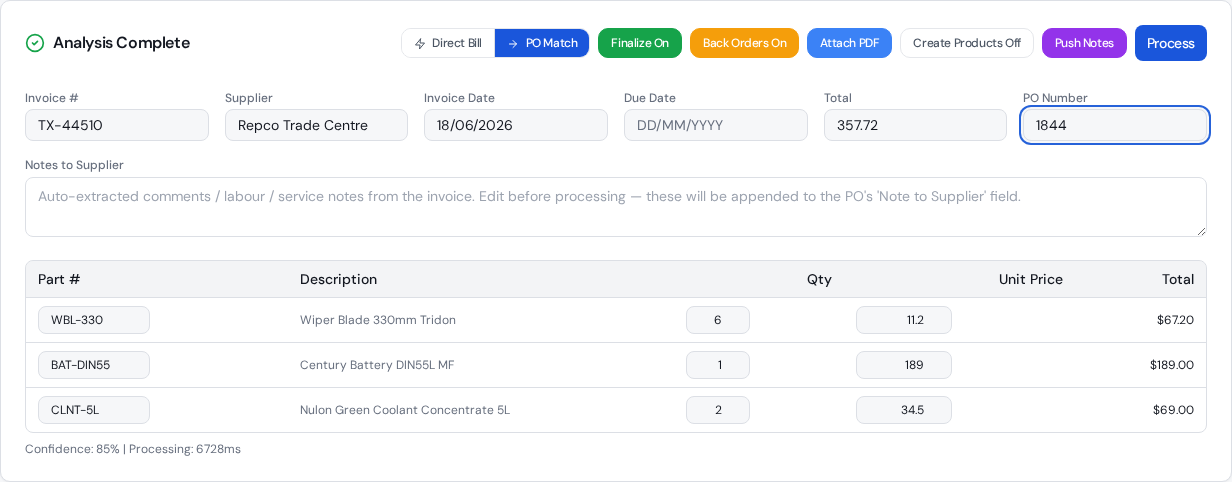
The settings that control it
Back Orders On/Off
Receive part deliveries and back order the rest, or only sync prices when an invoice is short.
Finalize On/Off
Finalise the bill, or leave it In Progress for review.
Frequently asked questions
Does it update my stock levels?
Receiving the PO in MechanicDesk is what updates stock, and Data Entry Pro does that receipt for you with the delivered quantities.
What if the price has changed since I ordered?
The PO's cost prices are updated to what the supplier invoiced before the PO is received, so your costs stay current.
Can I check before it's final?
Yes. With Finalize off, the bill is left In Progress so you can look over it in MechanicDesk.
Related workflows
Back order automation
When a supplier only sends part of your order, Data Entry Pro receives what arrived, lets MechanicDesk create the back order PO, and sends the next invoice to the open back order automatically.
Read morePurchase order automation
Automate MechanicDesk purchase orders: Data Entry Pro reads the PO number off the supplier invoice, matches every line, updates prices, receives the PO and creates the bill with the PDF attached.
Read moreSupplier invoice matching
How Data Entry Pro matches supplier invoice lines to your MechanicDesk stock and PO lines, including supplier part numbers, formatting differences and freight, without creating duplicate items.
Read moreReady to stop keying invoices?
7-day free trial. 10 invoices on us. No credit card required.